Nanako in Classic Japanese Monster Castle
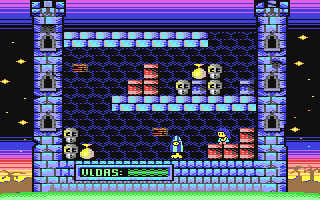
Nanako in Classic Japanese Monster Castle
Nanako in Classic Japanese Monster Castle is a platformer (single screen) game for the Commodore 64 that was released in 2010. The game was developed by Algarbi and published by (Public Domain).
Now you can play Nanako in Classic Japanese Monster Castle online, directly in your web browser! Our Commodore 64 emulator brings this retro gaming experience to life without requiring any downloads or plugins. Just click "Start Game" and enjoy this piece of gaming history.
Joystick 1:
- Left: A
- Right: D
- Up: W
- Down: S
- Fire: Left SHIFT
Joystick 2:
- Left: ←
- Right: →
- Up: ↑
- Down: ↓
- Fire: Left CTRL
We offer no C64 downloads due to copyright.
Getting Started
Click the "Start Game" button to load Nanako in Classic Japanese Monster Castle directly in your browser. This Platformer (Single Screen) game from 2010 runs using our Commodore 64 emulator - no downloads, plugins, or installation required.
Game Controls
Use the keyboard controls shown in the Joystick Controls section above. By default:
- Movement: WASD keys or Arrow keys
- Action/Fire: Left SHIFT or Left CTRL
- Switch Joysticks: Click the joystick swap icon if the controls don't respond
Tips for Best Experience
- Click the fullscreen button for an immersive gaming experience
- Use the save/load snapshot buttons to save your progress
- Adjust sound using the volume control icon
- This game is PAL format - designed for European C64 systems
Configuration
More Platformer (Single Screen) Games
View allIf you enjoyed Nanako in Classic Japanese Monster Castle, try these popular games from the same genre.
.webp)
Popular C64 Games
Browse allA few of the most-played Commodore 64 games on the site right now.